Scan and translate Spanish to English without flattening the page into plain text
A scanned page is just a picture. Ordinary translators either refuse it or hand back a wall of loose text with the layout gone.
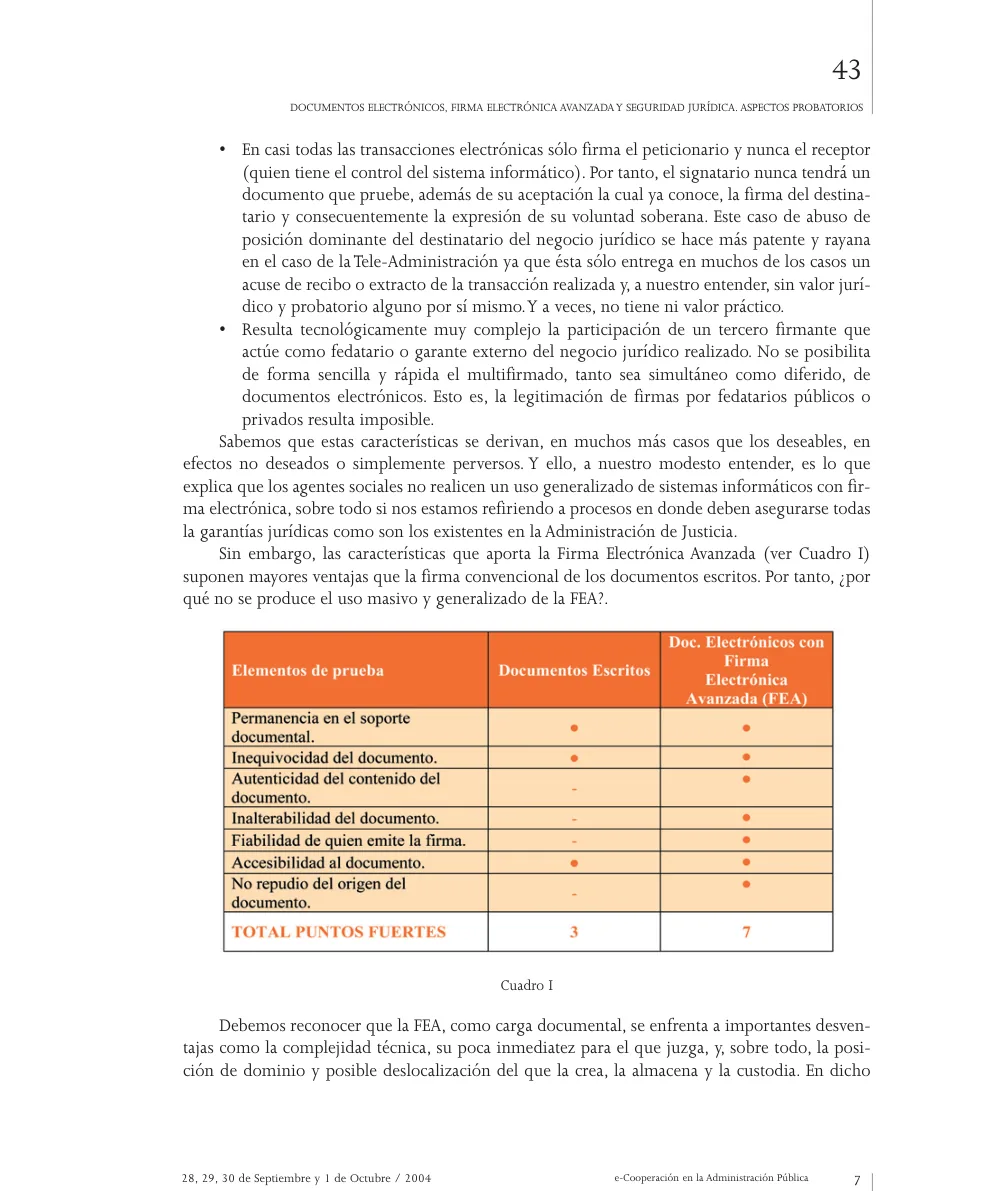
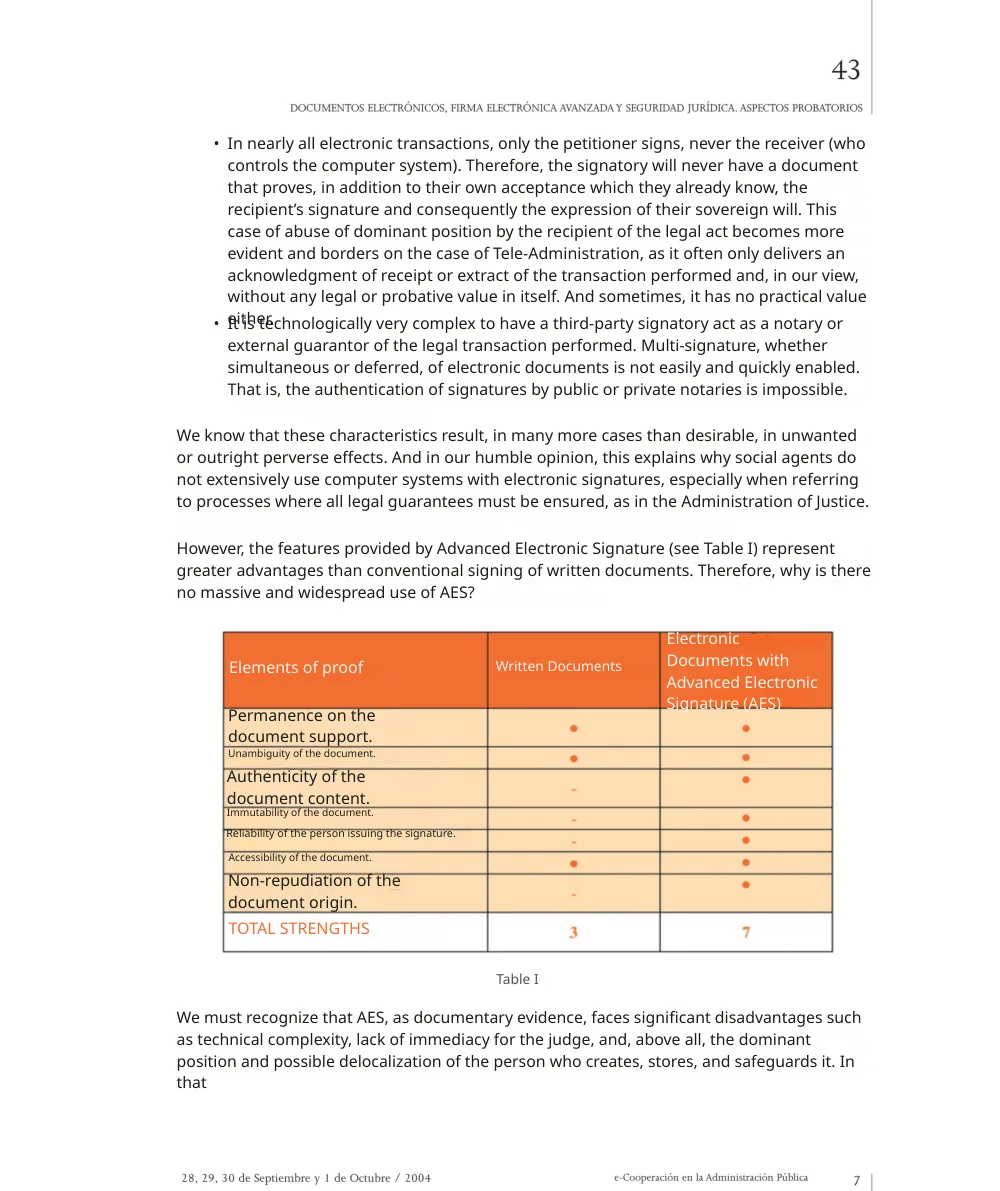
Reglyph reads the Spanish, erases it from the page image, and sets the English back into the same space. Stamps, seals and signature lines stay exactly where they were — they were never text to begin with.
A real scanned Spanish page, before and after
This is page 43 of a Spanish conference paper on electronic signatures and legal certainty. Nothing here is a mock-up — drag the handle and compare it line by line.
The argument on this page rests entirely on Table I, and the content of that table is not words — it is a grid of dots and dashes showing which properties each kind of document has. Pull the text out of this page and reflow it, which is what a normal translator does, and you get a table of empty rows with a heading on top. The two-tone orange banding, the marks and the 3-against-7 totals all have to stay where they are or the page stops meaning anything.
- the orange header band and the peach row shading of Table I
- every dot and dash in the grid — on this page the marks are the content
- the TOTAL STRENGTHS row, 3 against 7
- the page number and the rule down the outer margin
One word ran over: “either”, at the end of the first bullet, sits on top of the line below it — English needed one more line than the Spanish had left. In the table, rows whose English label grew are set smaller than the rest; compare “Unambiguity of the document” with “Permanence on the document support” directly above it.
Scanning Spanish documents — frequently asked
Already have a digital Spanish PDF rather than a scan? Spanish → English document translation
Can I scan a Spanish document with my phone and translate it?
Yes, as long as you save the scan as a PDF. Both phones have a document scanner built in that outputs one — on iPhone it is the Files app under Scan Documents, on Android it is the Google Drive app under Scan. Reglyph reads image-only PDFs directly, so there is no need to run OCR yourself first.
Will the stamps and signatures survive?
Yes. Stamps, seals, signatures and handwriting are part of the page image, not part of the text, so they are left where they are. Only the printed Spanish is removed and replaced with English.
My scan is a bit crooked — does that matter?
A slight skew is fine. What hurts is glare, a shadow falling across the page, and photographing at an angle so the lines converge. The document scanners built into iPhone and Android correct perspective automatically, which is why they beat a plain camera photo.
Choose your plan
Simple, scan-friendly pricing. Pages are pages — no multiplier for scanned files.
Pay-as-you-go
Translate a few pages. No commitment.
$0.30 a page, from 10 pages — you pay for exactly 10 pages.
- Pages never expire
- Up to 300 pages and 100 MB per file
Lite
Most popularFor individuals with scans to translate every month.
- $0.09 / page
- 100 pages every month
- 5 bonus pages, refreshed daily
- Up to 300 pages and 100 MB per file
- Pages reset each month
Pro
For high-volume users with scans to translate every week.
- $0.06 / page
- 500 pages every month
- 5 bonus pages, refreshed daily
- Unused pages roll over (up to 1,500)
- Up to 300 pages and 100 MB per file
Guides on translating scanned documents
The Best PDF Translation Services in 2026 (We Tried Them All)
Eight PDF translators run on the same scans and papers, scored on one table, with every tool's result shown side by side.
Read guideReglyph vs ChatGPT, Side by Side: Good on Simple Backgrounds. What About Photos and Papers?
Reglyph is our product, so we can't claim to be neutral. Both tools got the same files, and every result is shown as it came out.
Read guideReglyph vs Gemini, Side by Side: It Translates the Words, Not the Page
Reglyph is our product, so we can't claim to be neutral. Both tools got the same files, and every result is shown as it came out.
Read guide