Scan and translate French to English without flattening the page into plain text
French forms print the label inside the box, next to the value. Translate a scan of one as plain text and it comes back as a paragraph.
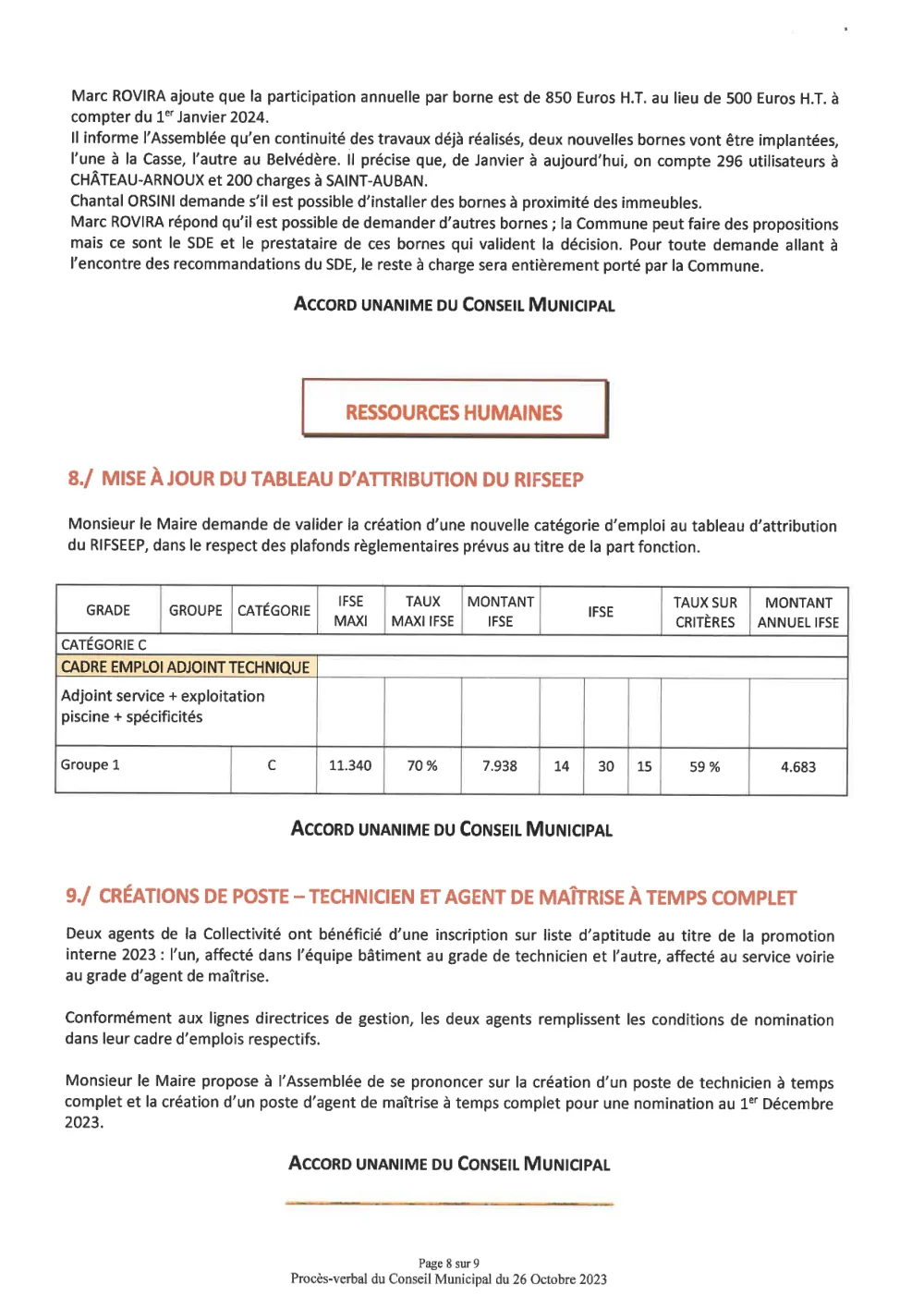
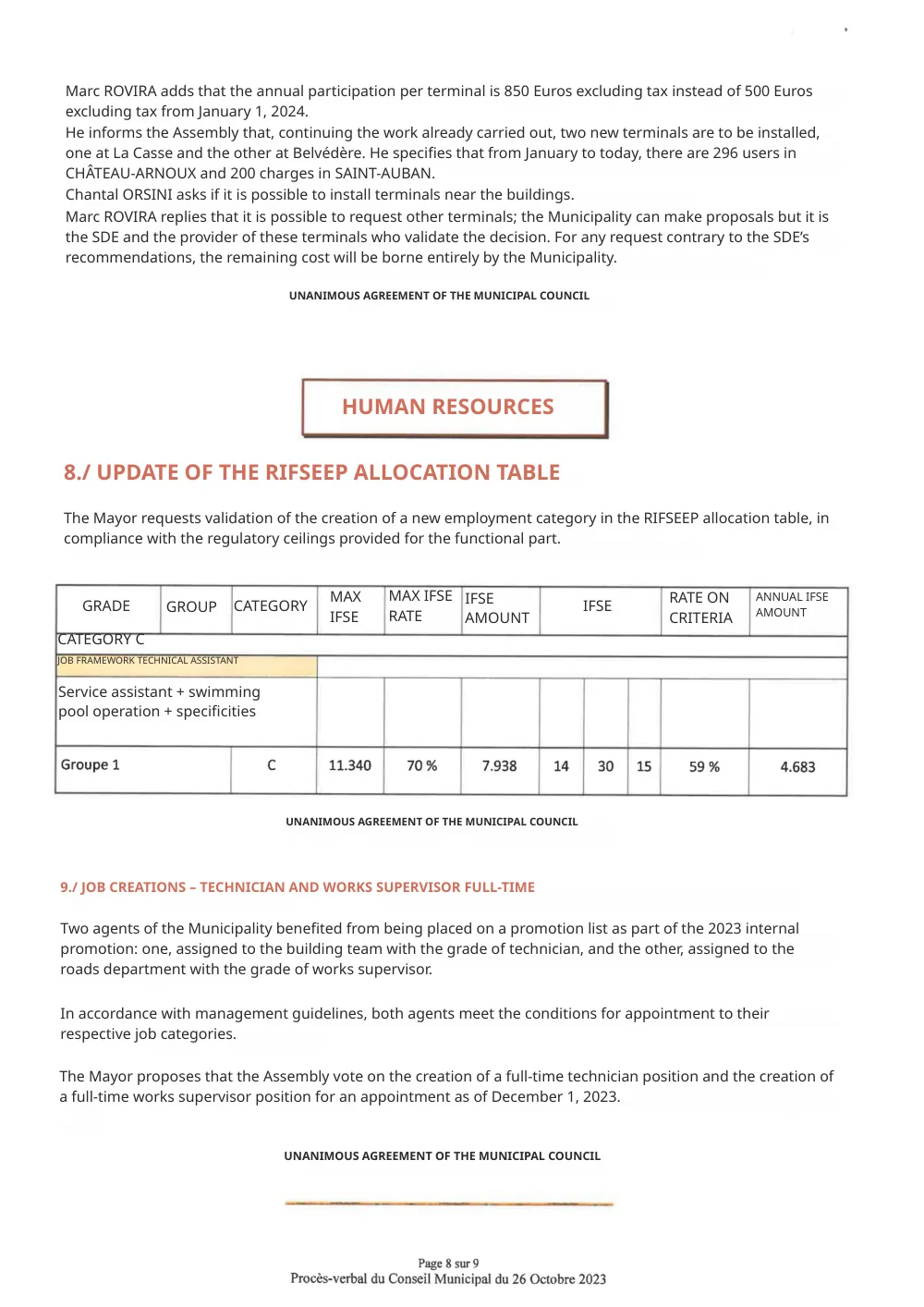
Reglyph rebuilds the English inside the original boxes. The rules, the column dividers and the ticked checkboxes are part of the scanned image, so they never move.
A real scanned French page, before and after
This is page 8 of the minutes of a French municipal council meeting. Nothing here is a mock-up — drag the handle and compare it line by line.
This is a working administrative record, not a report — the council voted on the row that is highlighted in yellow, and the highlight is how you know which row was amended. A salary grid like this is also the worst case for column widths: nine headers across a page that was already tight in French, every one of which gets longer in English, sitting above figures that must not move by a single digit.
- the boxed section banner and the orange rule beneath it
- the RIFSEEP allocation table, column for column
- the yellow highlight on the job-framework row
- every figure — 11.340, 70 %, 7.938, 14, 30, 15, 59 %, 4.683
English needs more room than French, so where a cell was already tight the type had to shrink: ANNUAL IFSE AMOUNT in the header, and the label in the yellow row, are set noticeably smaller than the text around them.
Scanning French documents — frequently asked
Already have a digital French PDF rather than a scan? French → English document translation
How do I scan a French document to PDF and translate it to English?
Use the scanner built into your phone — Files on iPhone, the Google Drive app on Android — which saves straight to PDF, then upload that PDF. Reglyph handles image-only PDFs, so you do not need to make the text selectable first.
Does it keep the boxes and table lines from French forms?
Yes. The rules, boxes and column dividers are part of the scanned page image and stay untouched. The English is typeset back into the same cells the French came out of, so a form still reads as a form.
Can it handle a multi-page scanned French document?
Yes — upload the whole PDF rather than page by page, and every page comes back with its own layout preserved. You get 5 free pages, so you can check a long document before paying for the rest.
Choose your plan
Simple, scan-friendly pricing. Pages are pages — no multiplier for scanned files.
Pay-as-you-go
Translate a few pages. No commitment.
$0.30 a page, from 10 pages — you pay for exactly 10 pages.
- Pages never expire
- Up to 300 pages and 100 MB per file
Lite
Most popularFor individuals with scans to translate every month.
- $0.09 / page
- 100 pages every month
- 5 bonus pages, refreshed daily
- Up to 300 pages and 100 MB per file
- Pages reset each month
Pro
For high-volume users with scans to translate every week.
- $0.06 / page
- 500 pages every month
- 5 bonus pages, refreshed daily
- Unused pages roll over (up to 1,500)
- Up to 300 pages and 100 MB per file
Guides on translating scanned documents
The Best PDF Translation Services in 2026 (We Tried Them All)
Eight PDF translators run on the same scans and papers, scored on one table, with every tool's result shown side by side.
Read guideReglyph vs ChatGPT, Side by Side: Good on Simple Backgrounds. What About Photos and Papers?
Reglyph is our product, so we can't claim to be neutral. Both tools got the same files, and every result is shown as it came out.
Read guideReglyph vs Gemini, Side by Side: It Translates the Words, Not the Page
Reglyph is our product, so we can't claim to be neutral. Both tools got the same files, and every result is shown as it came out.
Read guide