 Reglyph
The Best PDF Translation Services in 2026 (We Tried Them All)
We build a scanned-PDF translator, so we tried the popular options ourselves. None is a magic bullet — here's the honest breakdown of what each is good and bad at.
"Best PDF translation service" doesn't have one answer, because the right tool depends entirely on two things: whether your PDF is a normal digital file or a scan, and what you care about most — translation quality, price, keeping the layout, or privacy. We build a tool for scanned PDFs, so before you take our word for anything, know that we ran our own documents through the popular options — Google Translate, ChatGPT, Smallpdf, Adobe Acrobat, DeepL, and Bluente — and none of them is perfect. Each is genuinely good at something and frustrating at something else.
This is an honest rundown of where each one wins and where it falls down, so you can pick the right one for your document. We'll tell you plainly which cases other tools handle better than we do.
Is your PDF a scan (a photo of a page, where you can't select the text with your cursor) or a digital file (text you can highlight)? Most tools handle digital PDFs fine. Scanned PDFs need OCR first, and that's where the field splits — several popular tools quietly fail on scans.
DeepL — best translation quality
If raw translation accuracy is your priority and your document is mostly digital, DeepL is hard to beat — its output reads more naturally than most competitors, especially for European languages. It translates PDFs, Word, and PowerPoint, and its image-translation feature (currently in beta and free) can pull text from screenshots and simple scans.
The catches: DeepL extracts and translates the text rather than rebuilding a complex scanned page, so intricate tables and multi-column official documents don't come back pixel-perfect. The free plan is capped at 50,000 characters a month and one 5 MB file — and, importantly, DeepL's own policy says free-tier text may be used to train its models. For a private contract or certificate, that's worth knowing.
"Best for: high-quality translation of digital documents where you don't need the exact original layout back."
Google Translate — best free option for digital text
For a quick, free translation of a digital PDF or a chunk of text, Google Translate is the obvious default: no signup, 100+ languages, instant. But we hit a hard wall the moment we tried a scanned document — its Documents tab refused outright:
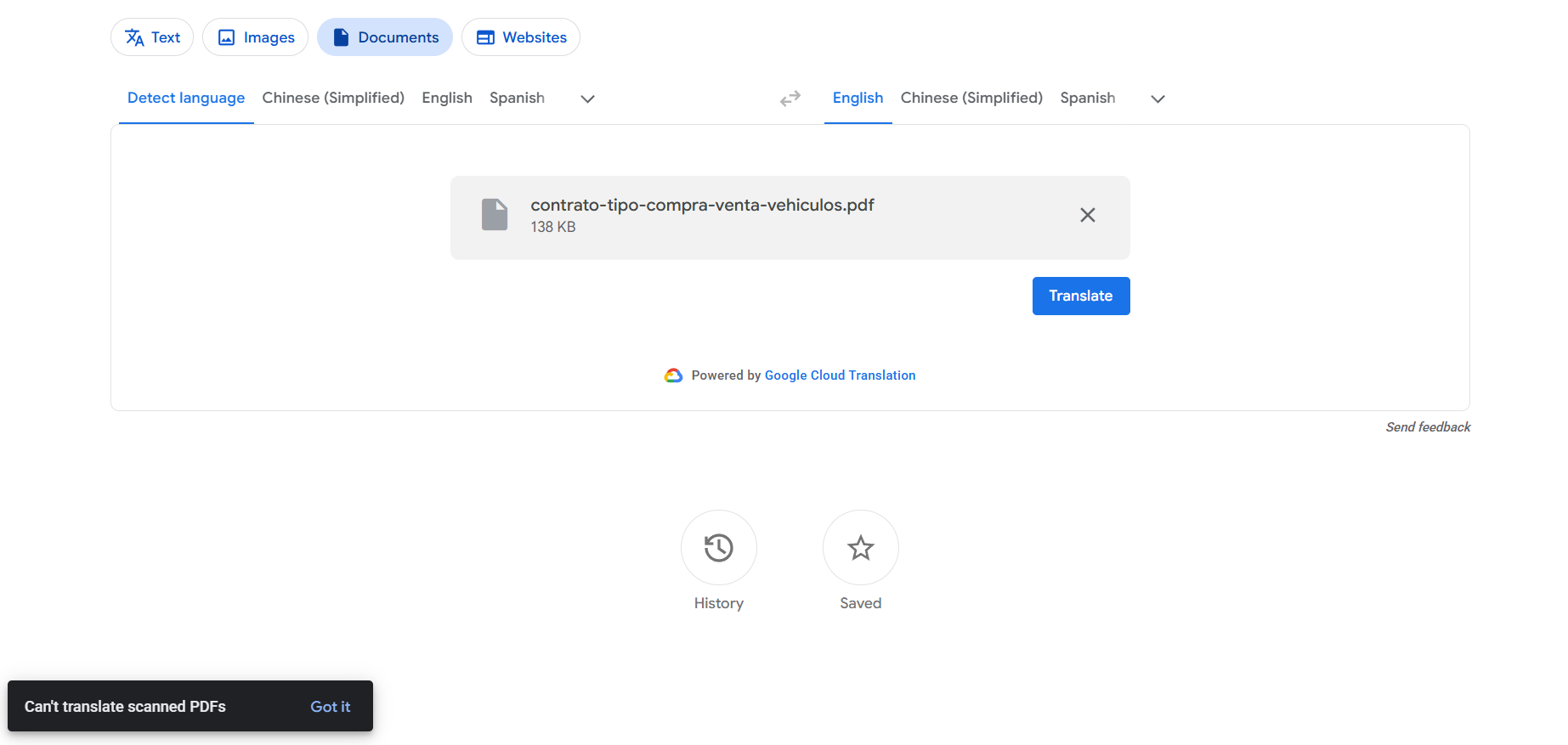
Google Translate only reads a PDF that already has a text layer; it won't OCR a scan. It also flattens tables and columns into plain text even when it does work. Great for gist and for digital files; a dead end for scanned or structured documents.
"Best for: free, fast translation of digital PDFs and short text — not scans."
ChatGPT (and other AI chat) — best for flexibility on a single page
ChatGPT is genuinely useful when you want to translate a page and also ask about it, or adjust tone. On a scan it uses its vision model to OCR the image — which works passably on a clean, high-DPI page. But it's not built to hand you a finished, layout-preserved PDF: multi-column formats, dense tables, footnotes, and reading order get misinterpreted, and low-resolution or skewed scans produce garbled or skipped text. You also copy-paste your way through it rather than getting a downloadable document.
"Best for: understanding or roughly translating a single page when you don't need clean formatting back."
Smallpdf — best all-in-one PDF suite with OCR
Smallpdf is a strong middle option: its Translate PDF tool does run OCR on scans, supports 100+ languages, and even offers two modes — "retain page layout" or "retain flowing text." If you already juggle lots of PDF tasks (merge, compress, convert) it's convenient to have translation in the same place, and files are deleted after an hour.
The limits: the free tier only lets you process two documents a day before pushing you to a 7-day trial and a subscription, and as a broad suite its scanned-document re-typesetting is decent rather than specialized. Solid generalist; not laser-focused on hard scans.
"Best for: occasional scanned-PDF translation inside a general PDF toolkit."
Adobe Acrobat — best if you already own it
Acrobat's AI Assistant can now translate a PDF from a prompt ("translate this into Spanish") without a separate export. For a scanned file, though, you first have to run "Scan & OCR / Recognize Text" to lay a text layer over the image — a manual extra step — and Acrobat is a paid, fairly heavy desktop suite. If it's already part of your workflow it's a reasonable choice; it's overkill to buy just for translation.
"Best for: existing Acrobat subscribers who don't mind running OCR first."
DocTranslator & Bluente — the closer specialists
A few tools compete more directly on scanned documents. DocTranslator handles image formats (JPG, PNG) and image-based PDFs with built-in OCR, preserves tables and multi-column layouts, and takes large files — a capable option, though it's subscription-based. Bluente positions itself as an AI translation platform; in our own testing its results on everyday scanned documents were middling. Honestly, across this whole category — ourselves included — no tool is flawless; they each trade something off.
"Best for: DocTranslator if you want a specialist that keeps layout and don't mind a subscription."
Reglyph — best for scanned PDFs where the layout has to survive
Here's where we fit, said plainly. We built Reglyph for the exact case the big generalists handle worst: an image-only scanned PDF — a contract, certificate, or transcript — that has to come back translated with its structure intact. It runs OCR on the scan, erases the original text, translates it, and re-typesets the translation back into the same positions, so tables, columns, stamps, and numbers stay where they were. You upload the scan as-is (or a phone photo), and download a finished PDF — no copy-paste, no separate OCR step, no rebuilding the formatting.
Where we're honest about our limits: if you have a plain digital document and just want the fastest or highest-quality text, DeepL or Google may serve you better; and if you need a quick snapshot translation on your phone, a camera-translate app is handier. We're focused on structured, scanned documents — and on privacy: the first 5 pages are free, files auto-delete in 24 hours, and your documents are never used for training.
"Best for: scanned or image-only PDFs — official and structured documents — where keeping the layout matters."
So which should you pick?
- Digital PDF, want the best translation quality → DeepL.
- Digital PDF or short text, want it free and instant → Google Translate.
- One page, want to translate and discuss it → ChatGPT.
- Occasional scans inside a broader PDF toolkit → Smallpdf.
- Already pay for Acrobat → Adobe's AI Assistant (run OCR first).
- A scanned or official document that has to keep its exact layout → a purpose-built scanned-PDF translator like Reglyph.
The honest summary: there's no single "best PDF translator" — there's a best one for your document. If yours is a clean digital file, the free general tools are fine. If it's a scan, or the formatting has to survive, that's the specific problem worth using a dedicated tool for.
Translate your scanned document now
Upload a scanned PDF or a photo — Reglyph OCRs it, translates it, and rebuilds the page so tables, stamps, and figures stay exactly where they were.
Translate 5 pages freeFrequently asked
What is the best PDF translation service?
It depends on your document. DeepL gives the most natural translation for digital files, Google Translate is best for a free quick job on digital text, and a dedicated scanned-PDF tool like Reglyph is best when your file is a scan or the layout has to be preserved. There's no single winner for every case.
What is the best free PDF translator?
For digital PDFs, Google Translate and DeepL's free tier are the most common free options. For scanned PDFs, most free tools fail because they don't run OCR — Reglyph gives you the first 5 pages free with the layout preserved, which is enough to translate a short scan for free.
Which PDF translator keeps the original formatting?
Tools that re-typeset the translation back onto the page rather than dumping plain text. Smallpdf's 'retain layout' mode, DocTranslator, and Reglyph all aim to preserve formatting; Google Translate and raw ChatGPT copy-paste do not.
Can DeepL or Google Translate handle scanned PDFs?
Google Translate cannot — its document tab refuses scanned PDFs because it doesn't OCR them. DeepL can extract text from some scans via its apps and beta image translation, but it won't rebuild a complex scanned layout. For scans that must keep their structure, a purpose-built tool works better.
What's the best way to translate a scanned document and keep the layout?
Use a translator built for scans that does OCR, translation, and re-typesetting in one pass, so tables, stamps, and columns stay in place. This avoids the copy-paste-and-rebuild workflow that general tools force you into.